notice: please create a custom view template for the guides class view-guides.html
Minecraft Automatic Stick Farm Build Guide (1.21.10)
NOTE: This article is still a work in progress! :)
This guide details the construction of a highly efficient and lossless stick farm using the Auto Crafter in Minecraft 1.21.10 (Java & Bedrock Editions). This farm is good for fairly early game, if you have access to hoppers and some redstone items. It does require a few more complex redstone items, so maybe closer to a mid game farm.

You can start small with this farm with a small amount of bamboo and hoppers and then extend it if you need more volume of the items later.
Also if you add a dual crafter it can be modified to create bamboo planks which is also quite useful .
Note: This farm should also work in lower or higher versions of minecraft that have access to the crafter and mud blocks. There is also a version of this farm that uses water streams and has less hoppers which i also might add later if there is any interest.
How the Farm Works
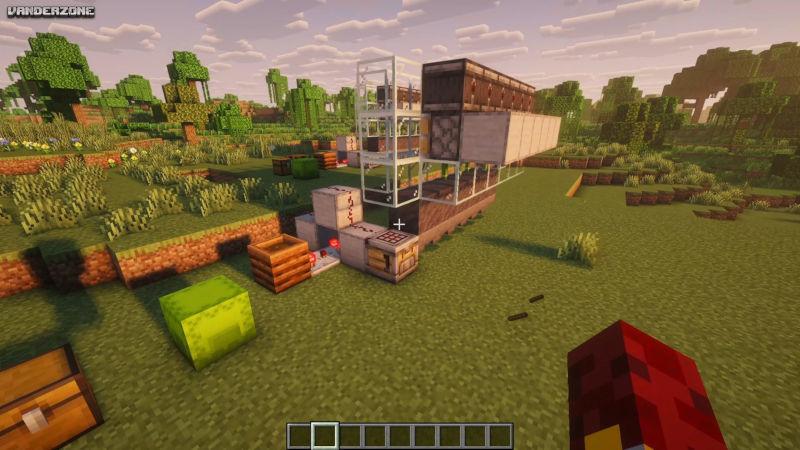
Here is a quick overview of how this Bamboo into Stick Farm works.
Bamboo is planted on Mud Blocks. When it grows, Observers trigger Pistons to harvest it once it has grown to its maximum height of three blocks.
The harvested bamboo is pulled through the Mud Blocks by Hoppers and fed into the Crafter. A specialized Redstone Comparator circuit ensures the Crafter only pulses to make sticks when items are actually present, eliminating constant ticking noise.
A more simple way to build this is just to have two comparators facing each other, but then if you have block sounds turned up this can become annoying. If you don't want to do the slightly more complex redstone.
I would recommend spending a little more time just making the circuit as it does perform more efficiently.
Required Items
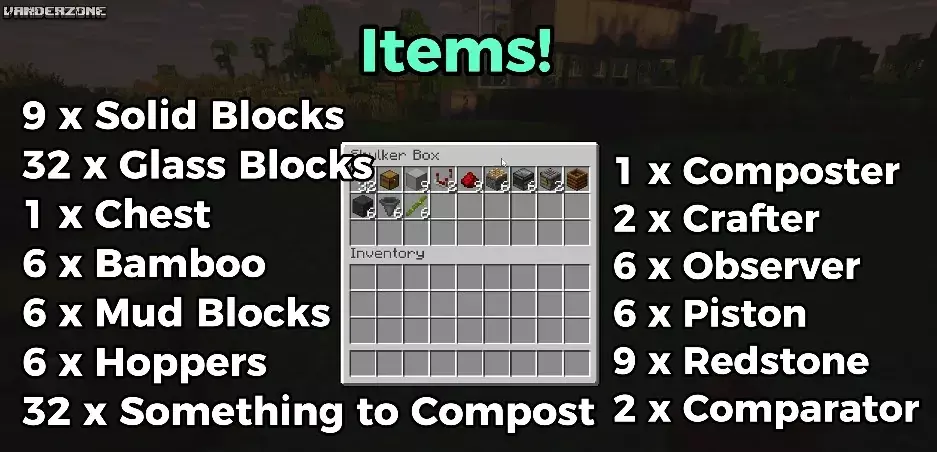
- 1 x Composter
- 1 x Crafter
- 6 x Observer
- 6 x Piston
- 9 x Redstone Dust
- 2 x Comparator
- 9 x Solid Blocks
- 32 x Glass Blocks (or other non-solid block for enclosure)
- 1 x Chest (for output)
- 6 x Bamboo
- 6 x Mud Blocks
- 6 x Hoppers
Step-by-Step Building Instructions
Part 1: Building the Bamboo Harvesting System
Place the Crafter & Hoppers:
Place the Crafter down. Attach six Hoppers into the side of the Crafter. (This hopper line can be extended for a larger farm).
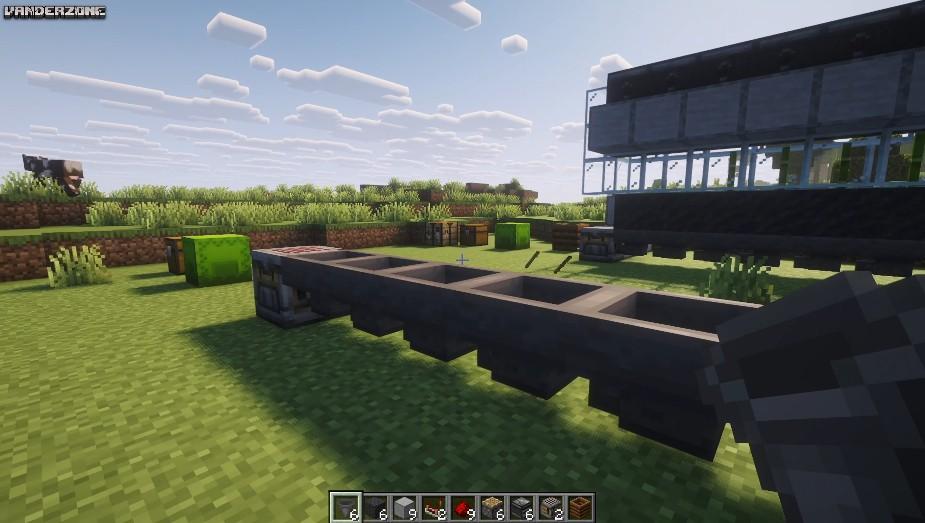
Place Mud Blocks & Bamboo: Place six Mud Blocks directly on top of the six Hoppers. Plant one piece of Bamboo on top of each Mud Block.
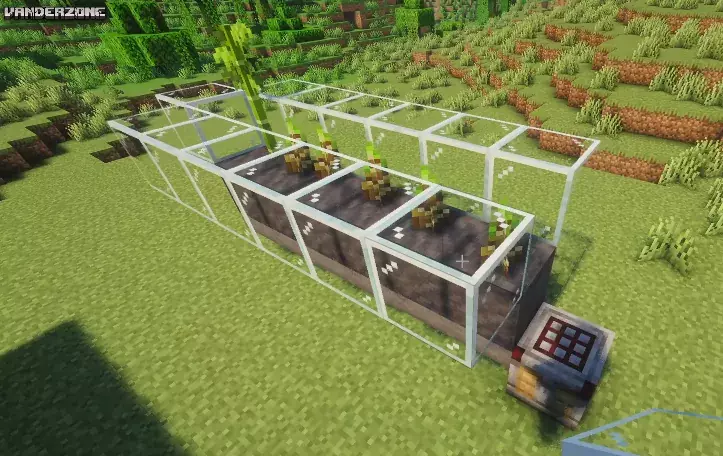
Build the Enclosure: Start building a wall of Glass Blocks (or any solid block) around the bamboo. Build it up at least three blocks high so that the bamboo does not fly out of the farm and should fall onto the mud blocks.
I found that sometimes the bamboo does land on the growing bamboo, but then if the piston fires again it should get pushed off into the mud block so you shouldnt get too much loss of bamboo this way.
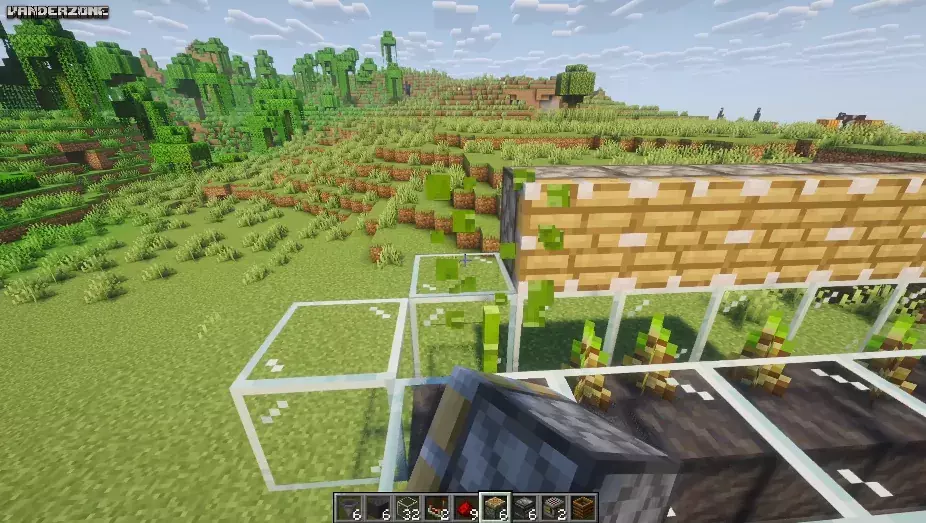
Place Pistons: Place a line of Pistons facing the bamboo, one block above the bamboo's base. The piston face should be positioned to chop off the growing bamboo.
[2:13]
Place Observers: Place a line of Observers facing the bamboo, directly above the Pistons. The output side (red dot) of the Observer should point away from the bamboo.
[2:29]
Add Redstone Power: Behind the Pistons, place a line of Solid Blocks. Place Redstone Dust along the top of these Solid Blocks to power the Pistons when an Observer detects growth.
[2:38]
Complete Enclosure: Finish the glass walls to ensure no harvested bamboo escapes the farm.
Part 2: Setting the Crafter and Quiet Redstone Circuit
[3:23]
Set Crafter Recipe: Interact with the Crafter and set the recipe for Sticks (two bamboo pieces side-by-side). Ensure the stick mode is enabled.
[3:57]
Place Comparator 1: Place a Solid Block next to the Crafter. Place a Comparator facing away from this block. Right-click/use the Comparator to turn it into Subtraction Mode (the torch light should be on).
[4:05]
Set up Power Line: Place a second Solid Block one block away from the Comparator's output (on the same level). Place Redstone Dust on top of the blocks, leading back toward the Crafter.
[4:18]
Place Comparator 2 & Composter: Place the Composter next to the power line block. Place a second Comparator facing into the first Comparator (the one in subtraction mode).
[4:27]
Set Composter Level: Fill the Composter with compostable items (like sugar cane) until it reaches Level 6 (the line just below the top). This sets the signal strength required to pulse the system.
The Crafter will now only pulse when the hoppers are filling with harvested bamboo, preventing constant noise and maximizing efficiency!
[5:43]
Part 3: Final Output
[5:38]
Place a Chest in front of the Crafter to collect your newly crafted sticks automatically. All done!
Here is the full video if you prefer watching.



published
FALSE
uid: 6DS1i
insdate: 2025-12-05 04:55:44
title: Minecraft Automatic Stick Farm Build Guide (1.21.10)
additional:
NOTE: This article is still a work in progress! :)
This guide details the construction of a highly efficient and lossless stick farm using the Auto Crafter in Minecraft 1.21.10 (Java & Bedrock Editions). This farm is good for fairly early game, if you have access to hoppers and some redstone items. It does require a few more complex redstone items, so maybe closer to a mid game farm.
You can start small with this farm with a small amount of bamboo and hoppers and then extend it if you need more volume of the items later.
Also if you add a dual crafter it can be modified to create bamboo planks which is also quite useful .
Note: This farm should also work in lower or higher versions of minecraft that have access to the crafter and mud blocks. There is also a version of this farm that uses water streams and has less hoppers which i also might add later if there is any interest.
How the Farm Works
Here is a quick overview of how this Bamboo into Stick Farm works.
Bamboo is planted on Mud Blocks. When it grows, Observers trigger Pistons to harvest it once it has grown to its maximum height of three blocks.
The harvested bamboo is pulled through the Mud Blocks by Hoppers and fed into the Crafter. A specialized Redstone Comparator circuit ensures the Crafter only pulses to make sticks when items are actually present, eliminating constant ticking noise.
A more simple way to build this is just to have two comparators facing each other, but then if you have block sounds turned up this can become annoying. If you don't want to do the slightly more complex redstone.
I would recommend spending a little more time just making the circuit as it does perform more efficiently.
Required Items
- 1 x Composter
- 1 x Crafter
- 6 x Observer
- 6 x Piston
- 9 x Redstone Dust
- 2 x Comparator
- 9 x Solid Blocks
- 32 x Glass Blocks (or other non-solid block for enclosure)
- 1 x Chest (for output)
- 6 x Bamboo
- 6 x Mud Blocks
- 6 x Hoppers
Step-by-Step Building Instructions
Part 1: Building the Bamboo Harvesting System
Place the Crafter & Hoppers:
Place the Crafter down. Attach six Hoppers into the side of the Crafter. (This hopper line can be extended for a larger farm).
Place Mud Blocks & Bamboo: Place six Mud Blocks directly on top of the six Hoppers. Plant one piece of Bamboo on top of each Mud Block.
Build the Enclosure: Start building a wall of Glass Blocks (or any solid block) around the bamboo. Build it up at least three blocks high so that the bamboo does not fly out of the farm and should fall onto the mud blocks.
I found that sometimes the bamboo does land on the growing bamboo, but then if the piston fires again it should get pushed off into the mud block so you shouldnt get too much loss of bamboo this way.
Place Pistons: Place a line of Pistons facing the bamboo, one block above the bamboo's base. The piston face should be positioned to chop off the growing bamboo.
[2:13]
Place Observers: Place a line of Observers facing the bamboo, directly above the Pistons. The output side (red dot) of the Observer should point away from the bamboo.
[2:29]
Add Redstone Power: Behind the Pistons, place a line of Solid Blocks. Place Redstone Dust along the top of these Solid Blocks to power the Pistons when an Observer detects growth.
[2:38]
Complete Enclosure: Finish the glass walls to ensure no harvested bamboo escapes the farm.
Part 2: Setting the Crafter and Quiet Redstone Circuit
[3:23]
Set Crafter Recipe: Interact with the Crafter and set the recipe for Sticks (two bamboo pieces side-by-side). Ensure the stick mode is enabled.
[3:57]
Place Comparator 1: Place a Solid Block next to the Crafter. Place a Comparator facing away from this block. Right-click/use the Comparator to turn it into Subtraction Mode (the torch light should be on).
[4:05]
Set up Power Line: Place a second Solid Block one block away from the Comparator's output (on the same level). Place Redstone Dust on top of the blocks, leading back toward the Crafter.
[4:18]
Place Comparator 2 & Composter: Place the Composter next to the power line block. Place a second Comparator facing into the first Comparator (the one in subtraction mode).
[4:27]
Set Composter Level: Fill the Composter with compostable items (like sugar cane) until it reaches Level 6 (the line just below the top). This sets the signal strength required to pulse the system.
The Crafter will now only pulse when the hoppers are filling with harvested bamboo, preventing constant noise and maximizing efficiency!
[5:43]
Part 3: Final Output
[5:38]
Place a Chest in front of the Crafter to collect your newly crafted sticks automatically. All done!
Here is the full video if you prefer watching.
category: Minecraft
md5:
image:
tags:
game_title:
game_uid:
author:
ext_link:
video_link:
misc_1:
misc_2:
script:
css:
published: FALSE
Add Comment
MMMOs Gaming